If you only wish to extract the alpha value for a color, you can simply extract it like so:
<?php
$color = imagecolorat($im, 50, 50);
$alpha = $color >> 24;
?>
It actually shifts off the first 24 bits (where 8x3 are used for each color), and returns the remaining 7 allocated bits (commonly used for alpha)imagecolorallocatealpha
(PHP 4 >= 4.3.2, PHP 5, PHP 7, PHP 8)
imagecolorallocatealpha — 画像で使用する色を透過度を指定して作成する
説明
imagecolorallocatealpha() は、
透明度を指定するパラメータ alpha
が追加されている以外は imagecolorallocate()
と等価です。
パラメータ
imageimagecreatetruecolor()のような画像作成関数が返す GdImage オブジェクト。
red-
赤コンポーネントの値。
green-
緑コンポーネントの値。
blue-
青コンポーネントの値。
alpha-
0から127までの値。0は完全に不透明な状態。127は完全に透明な状態を表します。
red、green
および blue には、
0 から 255 までの整数値か
0x00 から 0xFF までの十六進値を指定します。
戻り値
色 ID、あるいは作成に失敗した場合に false を返します。
変更履歴
| バージョン | 説明 |
|---|---|
| 8.0.0 |
image は、
GdImage
クラスのインスタンスを期待するようになりました。
これより前のバージョンでは、有効な gd resource が期待されていました。
|
例
例1 imagecolorallocatealpha() の使用例
<?php
$size = 300;
$image=imagecreatetruecolor($size, $size);

// 白い背景で黒いふちどりにします
$back = imagecolorallocate($image, 255, 255, 255);
$border = imagecolorallocate($image, 0, 0, 0);
imagefilledrectangle($image, 0, 0, $size - 1, $size - 1, $back);
imagerectangle($image, 0, 0, $size - 1, $size - 1, $border);

$yellow_x = 100;
$yellow_y = 75;
$red_x    = 120;
$red_y    = 165;
$blue_x   = 187;
$blue_y   = 125;
$radius   = 150;

// alpha 値を指定して色を作成します
$yellow = imagecolorallocatealpha($image, 255, 255, 0, 75);
$red    = imagecolorallocatealpha($image, 255, 0, 0, 75);
$blue   = imagecolorallocatealpha($image, 0, 0, 255, 75);

// 3つの重なる円を描きます
imagefilledellipse($image, $yellow_x, $yellow_y, $radius, $radius, $yellow);
imagefilledellipse($image, $red_x, $red_y, $radius, $radius, $red);
imagefilledellipse($image, $blue_x, $blue_y, $radius, $radius, $blue);

// 正しいヘッダを出力するのを忘れないように!
header('Content-Type: image/png');

// 最後に、結果を出力します
imagepng($image);
imagedestroy($image);
?>
上の例の出力は、 たとえば以下のようになります。
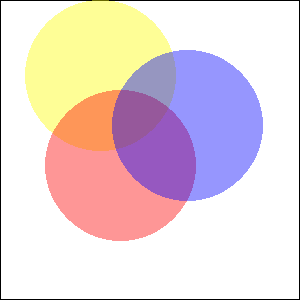
例2 imagecolorallocatealpha() 関数を使い、典型的なアルファ値を変換する
アルファの値を 0 にすると、通常は完全に透過なピクセルが指定されますし、
アルファチャネルは 8bit です。このようなアルファ値を
imagecolorallocatealpha() 関数と互換性がある値に変換するには、
いくつか簡単な計算をすれば十分です:
<?php
$alpha8 = 0; // 完全に透過
var_dump(127 - ($alpha8 >> 1));
$alpha8 = 255; // 完全に不透明
var_dump(127 - ($alpha8 >> 1));
?>
上の例の出力は以下となります。
int(127)
int(0)
参考
- imagecolorallocate() - 画像で使用する色を作成する
- imagecolordeallocate() - イメージの色リソースを開放する
+add a note
User Contributed Notes 3 notes
eric (at) junioronline.us 
18 years ago
Brett G 
8 years ago
When working with transparency, avoid imagecreate() and use imagecreatetruecolor() instead. Transparency effects may not work as expected within a palette-based image.
fjoggen at gmail dot com 
16 years ago
If you need to calculate the integer representation of a color with an alpha channel, without initialising an image and using the imagecolorallocatealpha function. Then this function might be of some help:

<?php
function alphaColor($hexColor,$alpha)
{
        return bindec(decbin($alpha).decbin(hexdec($hexColor));
}

echo alphaColor("FFFFFF",127);
?>