Function to get 5-sided polygon (pentagon) or star (pentagram) co-ords.
<?php
function _makeFiveSidedStar( $x, $y, $radius, $shape='polygon', $spiky=NULL ) {
$point = array() ; // new array
$angle = 360 / 5 ;
$point[0]['x'] = $x ;
$point[0]['y'] = $y - $radius ;
$point[2]['x'] = $x + ( $radius * cos( deg2rad( 90 - $angle ) ) ) ;
$point[2]['y'] = $y - ( $radius * sin( deg2rad( 90 - $angle ) ) ) ;
$point[4]['x'] = $x + ( $radius * sin( deg2rad( 180 - ( $angle*2 ) ) ) ) ;
$point[4]['y'] = $y + ( $radius * cos( deg2rad( 180 - ( $angle*2 ) ) ) ) ;
$point[6]['x'] = $x - ( $radius * sin( deg2rad( 180 - ( $angle*2 ) ) ) ) ;
$point[6]['y'] = $y + ( $radius * cos( deg2rad( 180 - ( $angle*2 ) ) ) ) ;
$point[8]['x'] = $x - ( $radius * cos( deg2rad( 90 - $angle ) ) ) ;
$point[8]['y'] = $y - ( $radius * sin( deg2rad( 90 - $angle ) ) ) ;
if( $shape == 'star' ) {
if( $spiky == NULL ) $spiky = 0.5 ; // degree of spikiness, default to 0.5
$indent = $radius * $spiky ;
$point[1]['x'] = $x + ( $indent * cos( deg2rad( 90 - $angle/2 ) ) ) ;
$point[1]['y'] = $y - ( $indent * sin( deg2rad( 90 - $angle/2 ) ) ) ;
$point[3]['x'] = $x + ( $indent * sin( deg2rad( 180 - $angle ) ) ) ;
$point[3]['y'] = $y - ( $indent * cos( deg2rad( 180 - $angle ) ) ) ;
$point[5]['x'] = $x ;
$point[5]['y'] = $y + ( $indent * sin( deg2rad( 180 - $angle ) ) ) ;
$point[7]['x'] = $x - ( $indent * sin( deg2rad( 180 - $angle ) ) ) ;
$point[7]['y'] = $y - ( $indent * cos( deg2rad( 180 - $angle ) ) ) ;
$point[9]['x'] = $x - ( $indent * cos( deg2rad( 90 - $angle/2 ) ) ) ;
$point[9]['y'] = $y - ( $indent * sin( deg2rad( 90 - $angle/2 ) ) ) ;
}
ksort( $point ) ;
$coords = array() ; // new array
foreach( $point as $pKey=>$pVal ) {
if( is_array( $pVal ) ) {
foreach( $pVal as $pSubKey=>$pSubVal ) {
if( !empty( $pSubVal ) ) array_push( $coords, $pSubVal ) ;
}
}
}
return $coords ;
}
$values = _makeFiveSidedStar( 100, 100, 50, 'star' ) ;
?>imagepolygon
(PHP 4, PHP 5, PHP 7, PHP 8)
imagepolygon — Dessine un polygone
Description
Signature à partir de PHP 8.0.0 (non supportée avec les arguments nommés)
Signature alternative (obsolète à partir de PHP 8.1.0)
imagepolygon() dessine un polygone dans l'image
image.
Liste de paramètres
imageUn objet GdImage, retournée par une des fonctions de création d'images, comme imagecreatetruecolor().
points-
Un tableau contenant les sommets du polygone, e.g. :
points[0] = x0 points[1] = y0 points[2] = x1 points[3] = y1 num_points-
Nombre total de points (sommets), qui doivent être d'au moins 3.
Si ce paramètre est omis conformément à la deuxième signature,pointsdoit avoir un nombre pair d'éléments, etnum_pointsest assumé d'êtrecount($points)/2. color-
Un identificateur de couleur créé avec imagecolorallocate().
Historique
| Version | Description |
|---|---|
| 8.1.0 |
Le paramètre num_points a été rendu obsolète.
|
| 8.0.0 |
image attend une instance de GdImage désormais;
auparavant, une resource gd était attendue.
|
Exemples
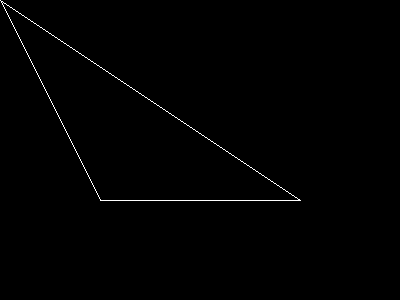
Exemple #1 Exemple avec imagepolygon()
<?php
// Création d'une image vide
$image = imagecreatetruecolor(400, 300);

// Alloue une couleur pour le polygone
$col_poly = imagecolorallocate($image, 255, 255, 255);

// Dessine le polygone
imagepolygon($image, array(
        0,   0,
        100, 200,
        300, 200
    ),
    3,
    $col_poly);

// Affichage de l'image sur le navigateur
header('Content-type: image/png');

imagepng($image);
imagedestroy($image);
?>
Résultat de l'exemple ci-dessus est similaire à :
Voir aussi
- imagefilledpolygon() - Dessine un polygone rempli
- imageopenpolygon() - Dessine un polygone ouvert
- imagecreate() - Crée une nouvelle image à palette
- imagecreatetruecolor() - Crée une nouvelle image en couleurs vraies
+add a note
User Contributed Notes 4 notes
tatlar at yahoo dot com 
17 years ago
licson0729 at gmail dot com 
11 years ago
Function to draw a n-sided regular polygon

<?php
$img = imagecreatetruecolor(1360,768);

function regularPolygon($img,$x,$y,$radius,$sides,$color)
{
    $points = array();
    for($a = 0;$a <= 360; $a += 360/$sides)
    {
        $points[] = $x + $radius * cos(deg2rad($a));
        $points[] = $y + $radius * sin(deg2rad($a));
    }
    return imagepolygon($img,$points,$sides,$color);
}

regularPolygon($img,1360/2,768/2,300,8,0xffffff);//Test draw

header('Content-type: image/png');
imagepng($img);
imagedestroy($img);
?>
jsnell at networkninja dot com 
23 years ago
Here are some handy routines for rotation and translation of polygons.  Scaling could be added easily as well.


<?php

function translate_point(&$x,&$y,$angle,$about_x,$about_y,$shift_x,$shift_y)

{

    $x -= $about_x;

    $y -= $about_y;

    $angle = ($angle / 180) * M_PI;

/* math:

[x2,y2] = [x,  *  [[cos(a),-sin(a)],

           y]      [sin(a),cos(a)]]

==>

x = x * cos(a) + y*sin(a)

y = x*-sin(a) + y*cos(a)

*/


    $new_x = $x * cos($angle) - $y * sin($angle);

    $new_y = $x * sin($angle) + $y * cos($angle);

    $x = $new_x+ $about_x + $shift_x ;

    $y = $new_y + $about_y + $shift_y;

}


function translate_poly($point_array, $angle, $about_x, $about_y,$shift_x,$shift_y)

{

    $translated_poly = Array();

    while(count($point_array) > 1)

    {

        $temp_x = array_shift($point_array);

        $temp_y = array_shift($point_array);

        translate_point($temp_x, $temp_y, $angle, $about_x, $about_y,$shift_x, $shift_y);

        array_push($translated_poly, $temp_x);

        array_push($translated_poly, $temp_y);

    }

    return $translated_poly;

}

?>
licson0729 at gmail dot com 
11 years ago
Here's a function to draw a n-sided star:

<?php
function drawStar($img,$x,$y,$radius,$sides,$color,$spikness=0.5)
{
    $point =array();
    $t = 0;
    for($a = 0;$a <= 360;$a += 360/($sides*2))
    {
        $t++;
        if($t % 2 == 0)
        {
            $point[] = $x + ($radius * $spikness) * cos(deg2rad($a));
            $point[] = $y + ($radius * $spikness) * sin(deg2rad($a));
        }else{
            $point[] = $x + $radius * cos(deg2rad($a));
            $point[] = $y + $radius * sin(deg2rad($a));
        }
    }
    return imagepolygon($img,$point,$sides*2,$color);
}
?>